
 EN
EN
Common Compatibility Issues in iPhone Series Battery Replacement and How to Avoid Them
When it comes to maintaining your device, battery replacement for iPhone series models is one of the most common and critical service needs. However, this process is far from straightforward. Compatibility issues between replacement batteries and specific iPhone models can lead to poor performance, error messages, rapid drain, or even safety concerns. Understanding what causes these mismatches and how to prevent them is essential for anyone managing iPhone maintenance at scale or even for a single device.
The iPhone lineup spans a wide range of hardware generations, from the compact iPhone SE to the advanced iPhone 14 Pro Max. Each generation uses batteries with specific voltage ratings, capacity values, connector configurations, and firmware-level authentication. This diversity means that battery replacement for iPhone series devices requires precise matching, not just a general fit. Even a battery that looks physically compatible may trigger software warnings or deliver substandard results if it does not meet model-specific requirements.
Why Compatibility Failures Happen in iPhone Battery Replacement
Hardware Differences Across iPhone Generations
Each iPhone model is engineered with unique internal dimensions and power specifications. Performing battery replacement for iPhone series models without verifying these specs is a primary cause of incompatibility. For example, the iPhone 12 and iPhone 14 may appear similar externally but use batteries with different voltage levels and connector pin layouts. Installing a battery intended for one generation into another can cause the device to refuse to charge, report incorrect capacity, or shut down unexpectedly.
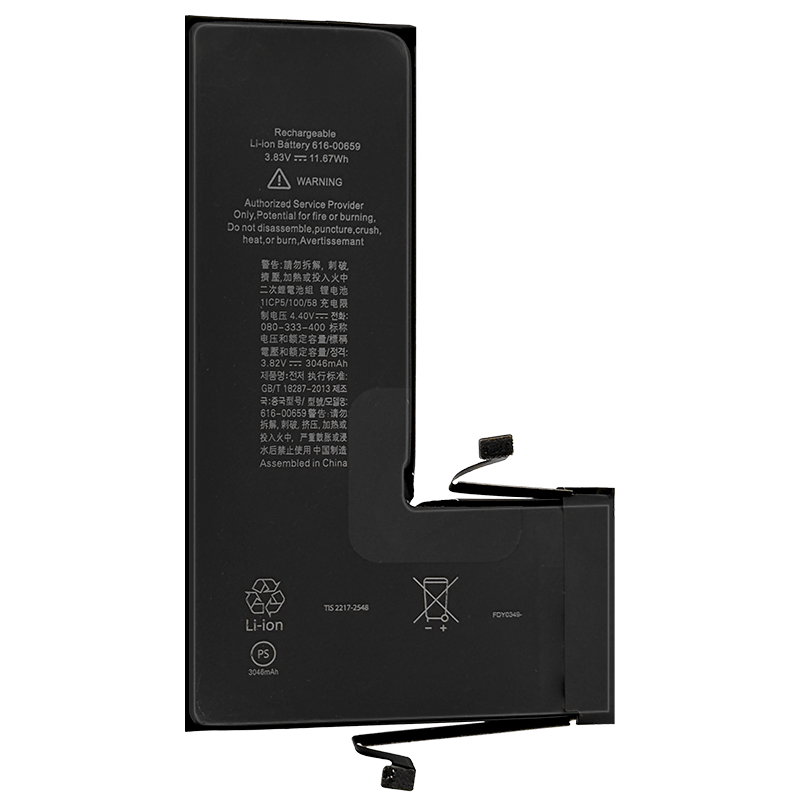
Physical size is another concern. The battery cells used in battery replacement for iPhone series repairs must match the exact dimensions of the original component. A battery that is even slightly thicker than specified can damage the screen or prevent the device from closing properly. Always cross-reference the model number found on the original battery label against the replacement unit before any installation begins.
Firmware Authentication and BMS Communication
Apple has implemented battery management system (BMS) authentication in newer iPhone models. This means that during battery replacement for iPhone series devices from iPhone 11 onward, the replacement battery must communicate correctly with the device's firmware. Batteries that lack a properly encoded BMS chip will trigger a 'Service Recommended' or 'Unable to Verify Battery' warning in the Settings menu. While the device may still function, these warnings can concern end users and reduce trust in the repair.
For professional repair operations, ensuring that battery replacement for iPhone series units includes correctly programmed BMS chips is non-negotiable. High-quality replacement batteries designed for specific models include BMS chips that communicate proper cycle count, temperature data, and charge state information back to iOS, preventing firmware-level rejection.
Common Mistakes That Lead to Compatibility Problems
Using Generic or Non-Model-Specific Batteries
One of the most frequent errors in battery replacement for iPhone series work is sourcing generic batteries labeled as 'universal' or 'compatible with multiple models.' These products are often produced without strict adherence to Apple's internal specifications. While they may fit physically, they frequently underperform in capacity, fail firmware checks, or degrade rapidly after a few charge cycles. The risk is especially high for newer models like the iPhone 13 and iPhone 14, where BMS authentication is strictly enforced.
To avoid this, always source batteries that are explicitly rated and tested for the exact iPhone model in question. A reliable battery replacement for iPhone series product will clearly state the compatible model numbers, voltage (typically 3.83V or 3.87V depending on generation), and rated capacity in mAh. Verifying these details before purchase eliminates the most common source of compatibility failures.
Improper Installation Techniques
Even a perfectly matched battery can cause problems if installed incorrectly. In battery replacement for iPhone series procedures, the adhesive strips used to secure the battery must be removed carefully to avoid puncturing the cell. A punctured lithium battery presents a serious safety hazard. Similarly, the battery connector must be pressed firmly and evenly into place. A partially seated connector can cause intermittent charging behavior or complete failure to power the device.
Technicians handling battery replacement for iPhone series repairs should always perform a calibration cycle after installation. This involves fully charging the device to 100%, then draining it completely before recharging. This step helps the device's battery management system accurately read the new cell's capacity and report correct percentage values to the user.
Best Practices for Reliable iPhone Battery Replacement
Verifying Model Numbers Before Sourcing
Before initiating any battery replacement for iPhone series job, identify the exact iPhone model using the device's Settings menu or the model number printed on the back. The iPhone series includes models with very similar names but different internal hardware, such as the iPhone 14 and iPhone 14 Plus, which use different battery capacities. Treating these as interchangeable leads directly to compatibility issues that could have been easily avoided.
Cross-check the model identifier (such as A2649 or A2893) against the battery manufacturer's compatibility list. This level of verification is especially important for battery replacement for iPhone series projects involving multiple units, where a sourcing error can affect an entire batch of repairs. A systematic pre-sourcing checklist dramatically reduces the risk of using mismatched components.
Choosing Quality-Certified Replacement Cells
Quality certification is a reliable indicator that a battery has been tested against original performance benchmarks. For battery replacement for iPhone series use, look for batteries that carry certifications such as CE, RoHS, or UN38.3, which cover electrical safety, hazardous substance compliance, and transport safety respectively. These certifications indicate the battery has undergone standardized testing and is less likely to fail prematurely or cause safety incidents.
Additionally, the capacity rating should match the original specification. For battery replacement for iPhone series models like the iPhone 14, the original battery capacity is approximately 3,279mAh at 3.87V. A replacement battery that claims significantly higher capacity than the original should be evaluated carefully, as inflated capacity claims are common with low-quality cells that cannot sustain performance over time. Realistic, accurate specifications signal a trustworthy product.
FAQ
Will any iPhone battery work in any iPhone model?
No. Each model in the iPhone lineup requires a battery with specific dimensions, voltage, and BMS programming. Using the wrong battery during battery replacement for iPhone series repairs can trigger firmware warnings, reduce performance, or cause hardware damage. Always match the battery to the exact model number.
Why does my iPhone show a battery health warning after replacement?
This warning typically appears when the replacement battery does not carry a BMS chip that communicates correctly with iOS. For successful battery replacement for iPhone series work on iPhone 11 and newer models, the battery must include a properly encoded management chip. Choosing a model-specific, quality-certified battery resolves this issue in most cases.
How often should battery replacement for iPhone series devices be performed?
Apple recommends considering battery replacement for iPhone series devices when battery health drops below 80%, which typically occurs after 500 full charge cycles. In practice, users who charge frequently may reach this threshold within two to three years. Replacing the battery at this stage restores original performance and extends the device's usable life significantly.
